

Automated email personalization is defined as the practice of using customer data, dynamic content templates, and automation logic to tailor email messages individually for each recipient at the moment of send or open. Unlike static merge tags that simply drop a first name into a subject line, modern personalization uses platforms like HubSpot, Klaviyo, and Mailchimp to execute conditional content blocks that select subject lines, body copy, offers, and send timing based on real behavioral and CRM data. The result is a message that feels written for one person, delivered at scale across thousands of contacts. This guide breaks down exactly how the technology works, which techniques produce the strongest results, and how to build workflows that hold up under real-world conditions.
What automated email personalization means technically
The industry term for this practice is dynamic email personalization, and it sits at the intersection of data architecture and marketing automation. At its core, automated email personalization combines CRM data with conditional rendering logic to produce unique email experiences without writing individual messages for each subscriber.
Here is how the process works in practice. Your email platform pulls subscriber attributes from a connected CRM or data source. Those attributes feed into conditional logic inside the template. Klaviyo, for example, uses Jinja-style if/else and for/iteration blocks directly inside message templates. When a campaign sends, the platform evaluates each recipient's data against those conditions and renders the matching content block. A subscriber in New York who purchased last week sees a different offer than a lapsed subscriber in Chicago who has not opened in 90 days, even though both received the same campaign.

How conditional logic controls what each recipient sees
The order of conditions in an if/elif/else chain matters more than most marketers realize. Condition order determines which content block a recipient sees, because the platform stops evaluating once it finds the first match. If your highest-value segment condition appears third in the chain, subscribers who qualify for both the first and third conditions will always see the first block. This is an easy mistake to make and a costly one to discover after a campaign has already sent.
Send-time optimization adds another layer. Rather than scheduling a campaign for 10 a.m. and hoping for the best, AI-powered send-time tools analyze each recipient's historical open behavior and deliver at the individual's peak window. This aligns delivery with personal habits rather than a marketer's calendar, which directly improves open rates across the list.
| Personalization layer | What it controls | Platform example |
|---|---|---|
| Subject line | First impression and open rate | HubSpot AI subject line generator |
| Dynamic content blocks | Body copy, images, and CTAs per segment | Klaviyo conditional templates |
| Offer logic | Discount tier or product recommendation | Mailchimp product recommendations |
| Send-time optimization | Delivery window per recipient | AI-driven send-time tools |
| Triggered automation | Entry into sequence based on behavior | Abandoned cart, welcome, re-engagement |
Pro Tip: Before your campaign goes live, test your conditional templates using subscriber records with intentionally blank or partial fields. Missing data is the most common cause of broken personalization blocks, and catching it in testing costs nothing compared to the deliverability damage it causes at scale.
What types of email personalization techniques drive results
True personalization requires layering multiple data signals rather than relying on a single attribute. The following techniques represent the full spectrum of what modern automation platforms support.
- Behavioral triggers. These fire based on specific subscriber actions: opening an email, clicking a link, visiting a product page, or abandoning a cart. Trigger-based automations deliver the highest relevance because the email responds directly to what a subscriber just did, not what segment they belong to.
- Lifecycle stage personalization. A new subscriber needs onboarding content. A repeat buyer needs loyalty rewards. A lapsed subscriber needs a re-engagement offer. Mapping content to lifecycle stage keeps messaging aligned with where the subscriber actually is in their relationship with your brand.
- Dynamic subject lines and preview text. Personalizing the subject line beyond a first name, such as referencing a recently viewed product category or a subscriber's city, increases open rates by making the email feel immediately relevant before it is even opened.
- Micro-segmentation. Rather than broad segments like "active" or "inactive," micro-segmentation groups subscribers by combinations of attributes: purchase frequency plus product category plus geographic region. This produces smaller, more precise audiences that respond to tighter messaging.
- AI-generated content variants. HubSpot's AI content tools and similar features in other platforms can generate multiple subject line and body copy variants, then select or test the best performer automatically. This removes the bottleneck of writing unique copy for every segment manually.
- Multi-channel triggers. Email personalization does not have to operate in isolation. A subscriber who clicks an email link can trigger a follow-up SMS, a retargeting ad on Facebook, or a push notification, creating a coordinated experience across channels.
Explore types of email campaigns to understand which campaign formats pair best with each personalization technique listed above.
Common challenges in automated email personalization
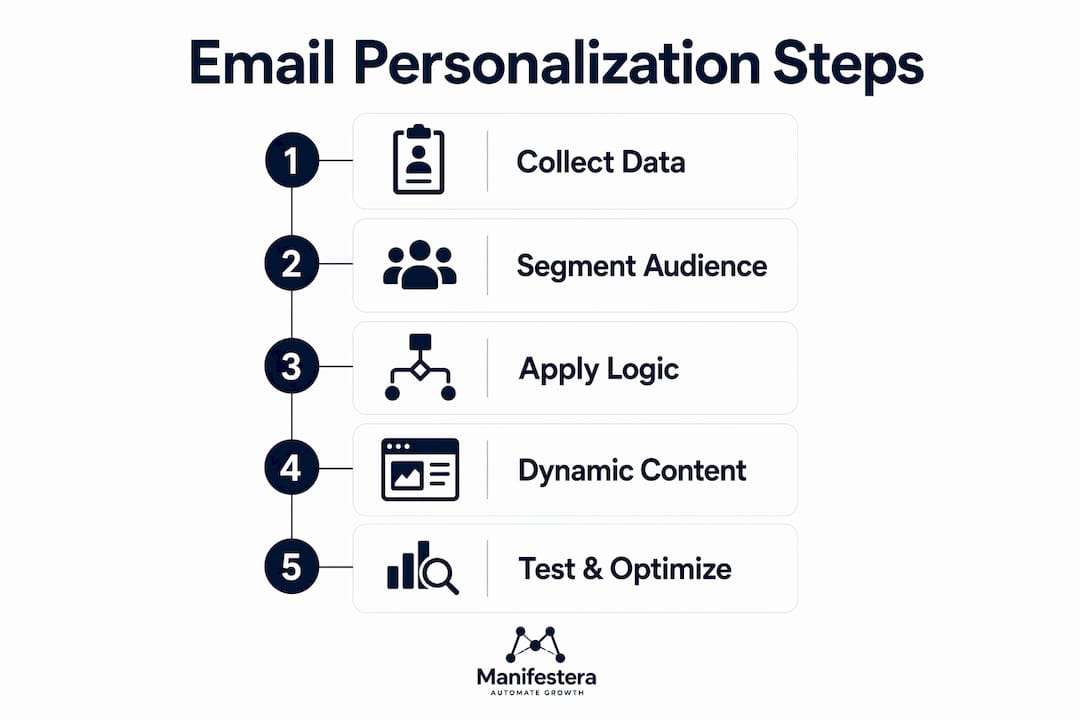
The most frequent failure point in personalized email programs is not strategy. It is data quality. Stale or missing CRM data causes broken personalization blocks, which can render as blank sections, mismatched offers, or fallback content that contradicts the rest of the message. Each of these outcomes damages subscriber trust and increases spam complaint rates.
Follow these best practices to keep your personalization program running cleanly:
- Audit your data before building templates. Map every personalization variable you plan to use against your actual CRM data completeness. If 40% of your list is missing a field you intend to personalize on, that field is not ready to use.
- Write fallback content for every conditional block. Every if/else chain needs a default else clause that renders something sensible when no condition is met. "Check out our latest collection" beats a blank white space every time.
- Test with edge-case profiles. Automated test generation that covers all conditional combinations, including empty fields and partial records, is the most reliable way to validate dynamic template logic before a live send.
- Maintain suppression lists actively. Subscribers who have unsubscribed, bounced, or marked previous emails as spam must be excluded from personalized campaigns. Sending to suppressed contacts is both a legal risk and a deliverability risk.
- Avoid copy drift at scale. When you maintain separate copy for every segment manually, versions diverge over time and brand voice becomes inconsistent. Dynamic content blocks solve this by keeping a single template structure while swapping only the variable elements, so your brand voice stays consistent across every variant.
Pro Tip: Run a "blank field" test send to a seed address with no data populated in any personalization field. If the email still reads coherently, your fallback logic is solid. If it looks broken, fix it before the campaign goes out.
How to design and optimize automated email workflows
Effective automation workflows require precise entry conditions, branching logic, and dynamic content blocks. A simple batch send with a first name in the subject line is not a personalization workflow. It is a mail merge.
Start by defining your trigger with specificity. "Subscriber joins list" is too broad. "Subscriber joins list via the checkout abandonment popup on the product page" gives you behavioral context that informs every subsequent message in the sequence. The more precise your entry condition, the more relevant your first email will be.
From there, map your sequence using branching logic based on subscriber attributes and in-sequence behavior. A welcome series for an e-commerce brand might branch at email two based on whether the subscriber clicked a product link in email one. Clickers enter a product-focused nurture path. Non-clickers receive a brand story email designed to build trust before making an offer.
Here is a practical framework for measuring and refining your workflow:
- Open rate by segment. Compare open rates across conditional branches to identify which content blocks resonate with which audiences.
- Click-to-open rate (CTOR). This metric isolates body content performance from subject line performance, giving you a cleaner read on whether your dynamic content is working.
- Conversion rate per trigger type. Abandoned cart sequences and post-purchase sequences will have very different conversion benchmarks. Track them separately.
- Exit rule performance. Monitor how many subscribers exit your workflow early due to conversion or disengagement. High early exits on a nurture sequence often signal that your entry condition is pulling in subscribers who are not ready for that path.
| Workflow metric | What it tells you | Optimization action |
|---|---|---|
| Open rate by branch | Which subject line variant wins | A/B test subject line variables |
| CTOR | Body content effectiveness | Revise CTA placement or offer |
| Conversion per trigger | ROI of each automation type | Prioritize highest-converting triggers |
| Early exit rate | Audience fit for the workflow | Tighten entry conditions |
Review the automated email workflow guide for a step-by-step approach to building these sequences from scratch in 2026.
Key takeaways
Automated email personalization succeeds when it is treated as a data rendering challenge, not a copywriting exercise, requiring clean CRM data, conditional templates, and precise trigger logic to deliver relevant experiences at scale.
| Point | Details |
|---|---|
| Personalization is data-driven | CRM data quality determines the ceiling of your personalization program. |
| Conditional logic controls content | If/else chains render unique blocks per recipient within a single campaign send. |
| Triggers outperform batch sends | Behavioral and lifecycle triggers produce higher relevance than scheduled campaigns. |
| Fallback content is non-negotiable | Every conditional block needs a default clause to prevent broken or blank renders. |
| Measure at the branch level | Track open rate and CTOR per conditional branch to identify what actually works. |
What working with personalization at scale actually taught us
At Manifestera, we have built and managed automated email programs for clients across a range of industries, and the pattern we see most often is this: marketers invest heavily in template design and copywriting, then launch on data that has not been cleaned in months. The personalization looks sophisticated in the brief and broken in the inbox.
The transition from manual campaigns to AI-driven personalization is not primarily a creative challenge. It is an infrastructure challenge. The brands that see the strongest results are the ones that treat their CRM as a living system, not a static export. They audit field completeness before building templates, not after.
One observation that surprises most clients: personalization at scale works best when you reduce the number of manually written copy variants, not increase them. A single well-structured conditional template with five dynamic blocks outperforms five separately written campaigns every time, because the template enforces brand voice consistency while the conditions handle relevance.
The emerging AI capabilities in platforms like HubSpot and Klaviyo are genuinely useful for subject line generation and send-time optimization. But they amplify what is already there. Feed them clean data and precise triggers, and they perform well. Feed them a messy list with vague entry conditions, and the AI simply automates irrelevance faster.
The brands winning with personalized email right now are not the ones with the most sophisticated technology. They are the ones with the most disciplined data practices.
— Manifestera
How Manifestera can power your personalization strategy
If you are ready to move beyond basic merge tags and build email programs that actually respond to subscriber behavior, Manifestera's AI automation services are built for exactly that. The team designs and implements full personalization workflows, including CRM data integration, conditional template architecture, trigger mapping, and ongoing performance measurement.
Manifestera works with marketing teams and business owners across the country to build automated systems that generate measurable engagement and revenue, not just open rates. Whether you are starting from scratch or optimizing an existing program, the Manhattan digital marketing team can audit your current setup and build a roadmap for scalable personalization. Reach out to start the conversation.
FAQ
What is automated email personalization?
Automated email personalization is the use of CRM data, conditional content logic, and automation workflows to tailor email messages uniquely for each recipient at send or open time. It goes beyond static merge tags by dynamically selecting subject lines, body copy, offers, and delivery timing based on individual subscriber data.
How does conditional logic work in email templates?
Conditional logic uses if/else and for/iteration blocks inside email templates to render different content for different recipients within a single campaign. The platform evaluates each subscriber's data against the conditions in order and displays the first matching block, which is why condition sequence matters significantly.
What are the most effective email personalization techniques?
Behavioral triggers, lifecycle stage segmentation, and dynamic content blocks consistently produce the strongest engagement results. Trigger-based campaigns such as abandoned cart, welcome, and re-engagement sequences deliver the highest relevance because they respond directly to subscriber actions.
Why does data quality matter so much for personalization?
Missing or stale data causes conditional blocks to render incorrectly, producing blank sections or mismatched content that damages both subscriber trust and email deliverability. Clean, complete CRM data is the foundation that every other personalization technique depends on.
How do you test dynamic email templates before sending?
Test your templates using subscriber records with intentionally blank or partial fields to verify that fallback content renders correctly. Automated variant testing that generates all conditional combinations, including edge cases, is the most reliable method for validating complex dynamic templates before a live send.