

An automated email marketing workflow is a preconfigured sequence of triggered emails designed to deliver the right message at the right time without manual intervention. The industry term for this practice is marketing automation, and building one correctly separates businesses that scale their communication from those stuck sending one-off blasts. Platforms like HubSpot, Salesforce Marketing Cloud, and Klaviyo make the automated email marketing workflow build accessible to marketers at every level. Done right, these systems increase engagement, recover lost revenue, and free your team to focus on strategy instead of repetitive sends. This guide walks you through every step, from prerequisites to optimization.
What do you need before building an automated email marketing workflow?
Before you write a single subject line, you need the right infrastructure in place. Choosing the wrong foundation wastes weeks of build time and creates compliance headaches you cannot easily undo.
Choosing the right platform
Select your automation platform based on features, integration needs, scalability, compliance support, and total cost of ownership. HubSpot works well for B2B teams that need CRM-native automation. Klaviyo is purpose-built for e-commerce brands running Shopify or WooCommerce stores. Salesforce Marketing Cloud suits enterprise teams that need Journey Builder's real-time API event triggers and complex conditional logic. Each platform handles triggers, delays, and branching differently, so your choice shapes every build decision that follows.

Core technical requirements
Every workflow build depends on four technical pillars:
- Email authentication: SPF, DKIM, and DMARC records must be configured on your sending domain. DMARC enforcement is mandatory for bulk senders on Gmail and Yahoo since 2024, acting as a policy layer beyond SPF and DKIM. Skipping this step means your emails land in spam before any subscriber sees them.
- CRM or data integration: Your platform must connect to your CRM, e-commerce store, or data warehouse so triggers fire based on real contact behavior, not guesswork.
- Segmentation logic: Build contact lists and segments before creating workflows. Sending a welcome series to existing customers because your segments overlap is a common and avoidable mistake.
- Compliance setup: Unsubscribe links must not require login or extra steps, and opt-outs must be honored within mandated timeframes. Configure this at the account level before any workflow goes live.
| Requirement | Why it matters |
|---|---|
| SPF, DKIM, DMARC | Authenticates your domain and protects inbox placement |
| CRM integration | Enables behavior-based triggers and accurate personalization |
| Contact segmentation | Prevents wrong audiences from entering the wrong workflows |
| Unsubscribe compliance | Satisfies CAN-SPAM and GDPR requirements from day one |
| Email templates | Speeds up build time and maintains brand consistency |
How to plan and structure your email automation strategy
Planning is where most workflow builds fail. Marketers jump into the platform before defining what success looks like, which produces workflows that run but never perform.
-
Define your workflow goal with a specific KPI. A welcome series goal is not "introduce the brand." It is "drive a first purchase within 7 days." A re-engagement workflow goal is not "win back subscribers." It is "reduce churn by moving inactive contacts to a suppression list." Modern KPIs prioritize clicks, conversions, revenue, and churn signals over open rates due to privacy changes from Apple Mail Protection. Tie every workflow to a measurable downstream outcome.
-
Select your entry trigger. Triggers fall into three categories: form submissions (newsletter signup, lead magnet download), behavioral events (product page visit, cart abandonment, purchase), and date-based events (subscription renewal, birthday). The trigger defines who enters the workflow and when, so precision matters. A cart abandonment trigger should fire only for contacts who added items but did not complete checkout, not for every page visitor.
-
Map your email sequence and delays. For e-commerce workflows, a three-email abandoned cart sequence sent at 30 to 60 minutes, 24 hours, and 48 to 72 hours achieves 2 to 3 times more revenue recovery than a single email, with a 10.7% conversion rate. That timing model applies broadly: send the first email while intent is hot, follow up when the contact has had time to reconsider, and close with urgency or a final offer.
-
Build personalization into the plan, not as an afterthought. Personalization goes beyond inserting a first name. Use dynamic content blocks that change based on purchase history, location, or lifecycle stage. Plan which merge tags and conditional content blocks you need before you open the email editor.
-
Set re-entry and exit rules explicitly. Decide whether a contact can re-enter the workflow after completing it, and define the exit criteria clearly. For example, a contact who purchases during a cart abandonment sequence should exit immediately. Leaving re-entry settings at default is one of the most common and costly mistakes in workflow builds.
Pro Tip: Draw your workflow as a flowchart on paper or in a tool like Miro before touching your email platform. Seeing the full logic visually catches gaps in branching conditions that are invisible inside a workflow builder.
Step-by-step process to build email campaigns in HubSpot and Salesforce
With your plan documented, the build itself follows a repeatable process regardless of platform.
-
Create your emails first. Build and save each email in your platform's email editor before opening the workflow builder. HubSpot's workflow tool requires emails to be saved as marketing emails before they can be added as workflow actions. This separation keeps your build organized and lets you QA each email independently.
-
Create the workflow and set the enrollment trigger. In HubSpot, navigate to Automation > Workflows > Create workflow. Select your trigger type (contact-based, deal-based, or company-based) and define the enrollment criteria precisely. In Salesforce Journey Builder, configure your entry source as an API Event for real-time triggers or a data extension import for scheduled entry. Salesforce recommends setting re-entry controls before going live to avoid complex fixes after launch.
-
Add emails and configure delays. In HubSpot, add a short delay after setting marketing status to allow system processing before the send action fires. A delay of 5 to 10 minutes between a trigger and the first email prevents race conditions where the contact record has not fully updated. Between subsequent emails, set delays based on your timing plan from step 3 of the planning phase.
-
Add conditional splits. Conditional splits route contacts down different paths based on behavior. A contact who opens email one but does not click gets a different email two than a contact who did not open at all. In HubSpot, use "If/then branches." In Salesforce Journey Builder, use Decision Splits. This branching logic is what separates a functional workflow from a high-performing one.
-
Set exit criteria and suppression. Define which actions remove a contact from the workflow. Implement webhook-driven suppression tables for real-time bounce, complaint, and unsubscribe handling to avoid sending to invalid addresses mid-sequence.
-
Test before publishing. Send test emails to internal addresses for every branch of the workflow. In HubSpot, use the "Test" function to simulate enrollment. Check rendering on mobile and desktop, verify all merge tags populate correctly, and confirm links resolve to the right URLs.
- Never publish a workflow without testing every conditional branch
- Confirm unsubscribe links work and route to a compliant preference center
- Verify that exit criteria fire correctly by enrolling a test contact and triggering the exit condition manually
Pro Tip: Use a central workflow registry, a shared spreadsheet or project management doc, to log every live workflow with its owner, trigger, exit criteria, and last audit date. This prevents silent workflow failures when team members change or platforms update.
How to optimize and maintain your email workflow for lasting results
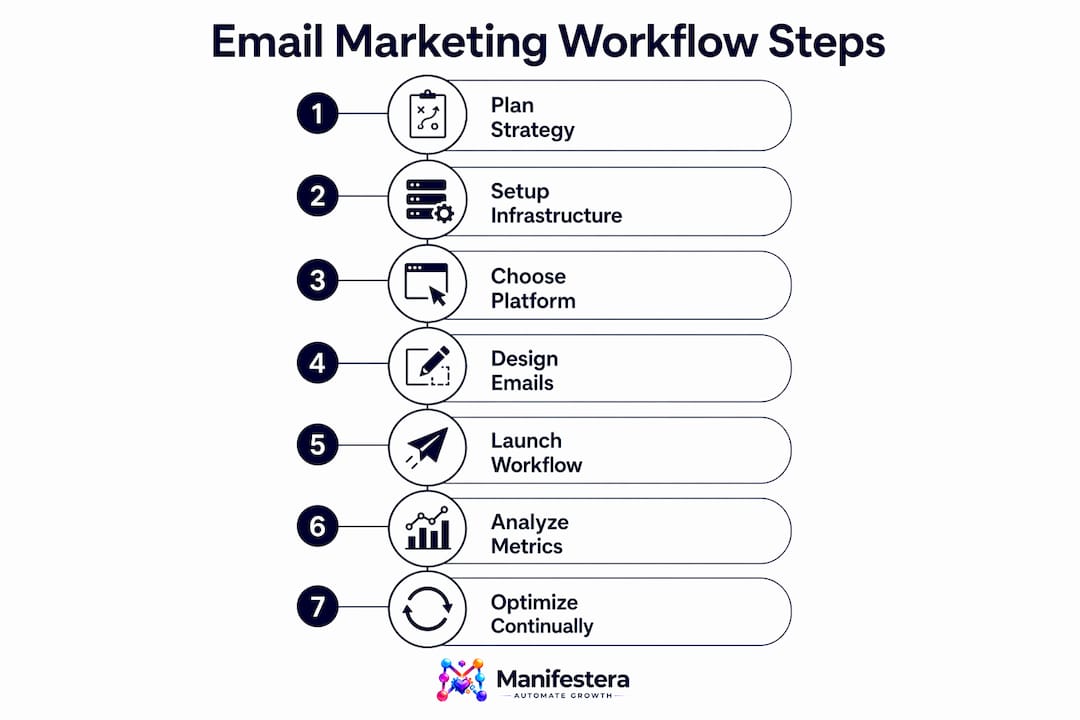
Publishing a workflow is the beginning, not the end. Workflows degrade over time as contact behavior changes, deliverability conditions shift, and business goals evolve.
Analyze performance using the right metrics. Track click-through rate, conversion rate, revenue per email, and unsubscribe rate by workflow step. Open rate data is unreliable since Apple's Mail Privacy Protection inflates it artificially. If a specific email in your sequence shows a sharp drop in clicks compared to the previous step, that email is the weak link and needs a content or timing revision.
Maintain deliverability with ongoing list hygiene. Email deliverability requires SPF, DKIM, DMARC authentication, list hygiene, suppression logic, and continuous monitoring to avoid delivery failures. Remove hard bounces immediately and suppress contacts who have not engaged in 90 to 180 days before they damage your sender reputation.
For high-volume senders, separate transactional from bulk sends using priority lanes and implement exponential backoff with dead-letter queues to reduce operational risk. This architecture prevents a spike in marketing sends from delaying time-sensitive transactional emails like password resets or order confirmations.
Conduct a workflow audit every quarter. Review each live workflow against its original KPI, check whether the entry trigger still reflects current business logic, and retire workflows that no longer serve an active goal. Stale workflows with outdated offers or broken links actively harm your brand and your sender score.
"Automation platforms don't replace marketer judgment. The marketer's skill in setting timing, logic, and motivation is what determines whether a workflow converts or just runs." — Kath Pay, email marketing strategist
Key takeaways
Effective automated email marketing workflows require precise planning, correct technical setup, and continuous performance monitoring to deliver measurable revenue and engagement results.
| Point | Details |
|---|---|
| Authentication is non-negotiable | Configure SPF, DKIM, and DMARC before any workflow goes live to protect inbox placement. |
| Plan before you build | Define KPIs, triggers, timing, and exit criteria on paper before opening the workflow builder. |
| Sequence timing drives revenue | A three-email abandoned cart sequence outperforms single sends by 2 to 3 times in revenue recovery. |
| Conditional splits separate good from great | Branch logic based on contact behavior turns a basic sequence into a high-performing workflow. |
| Audit quarterly | Review live workflows every 90 days to retire stale logic and fix deliverability risks. |
What Manifestera has learned from building hundreds of workflows
The most common mistake we see from marketing teams is treating workflow automation as a set-it-and-forget-it system. They spend two weeks building a welcome series, publish it, and never look at it again. Six months later, the workflow is sending emails with outdated offers to contacts who purchased three times since enrolling. The automation ran perfectly. The results were poor.
The second pattern we see is over-engineering. Teams build 12-step sequences with seven conditional branches before they have enough data to know what their audience actually responds to. Start with three emails, one clear trigger, and one exit condition. Measure for 60 days. Then add complexity based on what the data shows, not what a competitor's case study recommends.
Timing and segmentation matter more than copy in most workflows we have audited. A well-timed, plainly written email to the right segment outperforms a beautifully designed email sent to the wrong audience at the wrong moment. Personalization beyond first-name insertion, specifically using purchase history, browsing behavior, and lifecycle stage, is where we consistently see the largest lift in conversion rates for our clients.
The smart campaign automation guide we published for SMBs covers trigger configurations that apply directly to the planning phase described above. If you are choosing between platforms, the top digital marketing channels breakdown includes a practical comparison of automation platform features by business size.
One final point: re-entry settings are the most overlooked configuration in every platform. Before you publish any workflow, ask yourself what happens when the same contact qualifies for the trigger again. If you cannot answer that question confidently, the workflow is not ready to go live.
— Manifestera
How Manifestera builds workflows that actually convert
Manifestera designs and deploys AI-powered email automation systems for small and mid-sized businesses across the United States. Our team handles platform setup, trigger configuration, segmentation logic, and deliverability infrastructure so your workflows run correctly from day one. We connect your CRM, e-commerce platform, or lead capture system to a custom workflow architecture built around your specific revenue goals, not generic templates. If you want workflows that generate measurable results rather than just activity, explore our AI marketing automation services to see how we approach workflow strategy and execution for businesses ready to scale. You can also review our funnel-building framework for context on how automated email sequences fit into a broader lead nurturing system.
FAQ
What is an automated email marketing workflow?
An automated email marketing workflow is a sequence of triggered emails sent automatically based on contact behavior or data conditions, without manual sends. Common examples include welcome series, abandoned cart sequences, and post-purchase follow-ups.
Which platforms are best for building email workflows?
HubSpot, Salesforce Marketing Cloud, and Klaviyo are the leading platforms for building automated email sequences, each suited to different business sizes and use cases. Choose based on your CRM integration needs, e-commerce stack, and required workflow complexity.
How many emails should a workflow contain?
Start with three emails per workflow, then expand based on performance data. A three-email abandoned cart sequence, for example, recovers 2 to 3 times more revenue than a single email at a 10.7% conversion rate.
What causes workflows to fail after launch?
The most common causes are incorrect re-entry settings, missing exit criteria, and deliverability issues from poor list hygiene or missing email authentication records like DMARC. Quarterly audits catch these problems before they compound.
How do you measure workflow performance accurately?
Track click-through rate, conversion rate, and revenue per email rather than open rate, since Apple Mail Privacy Protection makes open data unreliable. Measure each step in the sequence individually to identify exactly where contacts disengage.